Free Hourly Invoice Template

Word, Excel and PDF · Free, no signup · Updated October 4, 2026

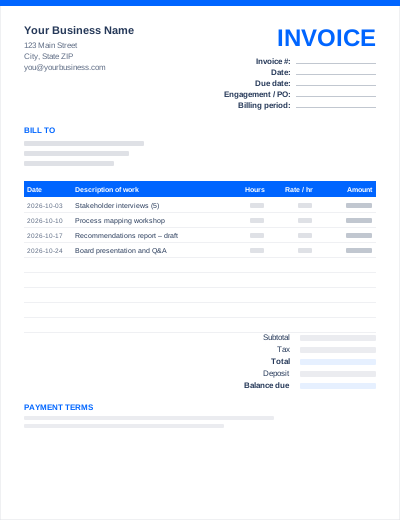
The hourly template is built around a timesheet: each line has the date, what you worked on, the hours and your hourly rate. A billing-period field in the header tells the client which weeks or month the invoice covers.

Enter hours as decimals (1.5 for an hour and a half, 2.25 for two hours fifteen minutes). The Excel file multiplies hours by rate on every line and adds up the period total.
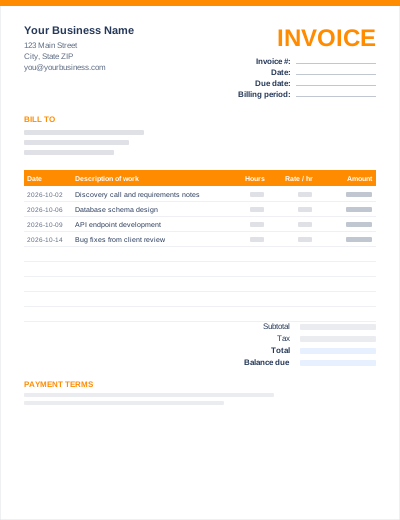
Preview of the Hourly Invoice template layout

What's in the template

  • Line-item columns: Date, Description of work, Hours, Rate / hr, Amount
  • Your details, client (Bill to) block, invoice number, invoice date and due date
  • Extra header fields: Billing period
  • Subtotal, tax at a rate you set, total
  • Amount paid and balance due
  • Payment terms and instructions section

Sample entries show how to fill it in; replace them with your own. All three files share the same layout. The Excel version calculates line amounts and totals; the PDF is a blank, print-ready form.

Best for

  • Contractors and freelancers paid by the hour
  • Tutors, coaches and therapists billing sessions
  • Monthly invoices built from a timesheet
  • Support or maintenance work billed in increments

How to use this template

  1. Download the format you prefer: Word to edit like a document, Excel for automatic totals, or the PDF to print and fill in by hand.
  2. Add your details: business name, address, contact details and, if you have one, your logo and tax number.
  3. Fill in the client and invoice details: who you are billing, a unique invoice number, the invoice date and the due date.
  4. List what you are billing, one line per item or task, with the date of each.
  5. Check the totals (Excel calculates them; in Word, work them out or use the online generator), then add payment terms and how to pay.
  6. Save as PDF and send. See how to send an invoice.

Prefer not to download anything? Fill in the same fields in the free online invoice generator and save the result as a PDF.

Tips for hourly invoices

Convert minutes correctly

15 minutes = 0.25 h, 20 minutes = 0.33 h, 30 minutes = 0.5 h, 45 minutes = 0.75 h. Decide whether you round to the nearest 6, 15 or 30 minutes and say so in your agreement.

Describe outcomes, not just activity

"API endpoint development (orders, invoices)" is easier to approve than "Development".

Invoice on a fixed rhythm

Weekly or monthly invoicing keeps each bill small and easy to approve.

Frequently asked questions

How do I calculate an hourly invoice?

Multiply the hours for each line by the hourly rate, add the lines for the subtotal, then add any tax. For example 6.5 hours × $85 = $552.50.

Should I attach a timesheet?

For larger invoices, yes. Many clients want to see dates and tasks. The line items on this template can act as a simple timesheet.

Can I use different rates on one invoice?

Yes. The rate is entered per line, so you can bill for example consulting at one rate and admin at another.